
Home Documentation Writing Reading Pictures1 Pictures2 Formulas Date/Time SheetByName
Merging Grouping InsertRowCol NumFormats Formats Fonts Buffer1 Buffer2 Copying TopNFilter
Sorting StringFilter NumberFilter FilterByValues Protection Replacing RichString BeginWith
ColorScale OpRule AltRows
Merging Grouping InsertRowCol NumFormats Formats Fonts Buffer1 Buffer2 Copying TopNFilter
Sorting StringFilter NumberFilter FilterByValues Protection Replacing RichString BeginWith
ColorScale OpRule AltRows
Using number formats
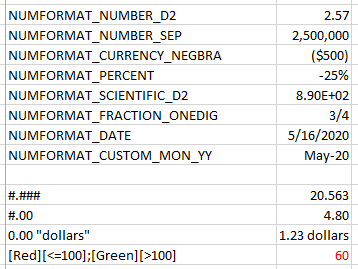
This example shows how to use built-in and custom number formats.See the result in the numformats.xlsx file.
#include "libxl.h"

using namespace libxl;

int main()
{
    Book* book = xlCreateXMLBook();

    Sheet* sheet = book->addSheet(L"my");

    sheet->setCol(0, 0, 38);
    sheet->setCol(1, 1, 10);

    // built-in number formats

    Format* format1 = book->addFormat();
    format1->setNumFormat(NUMFORMAT_NUMBER_D2);

    sheet->writeStr(3, 0, L"NUMFORMAT_NUMBER_D2");
    sheet->writeNum(3, 1, 2.5681, format1);

    Format* format2 = book->addFormat();
    format2->setNumFormat(NUMFORMAT_NUMBER_SEP);

    sheet->writeStr(4, 0, L"NUMFORMAT_NUMBER_SEP");
    sheet->writeNum(4, 1, 2500000, format2);

    Format* format3 = book->addFormat();
    format3->setNumFormat(NUMFORMAT_CURRENCY_NEGBRA);

    sheet->writeStr(5, 0, L"NUMFORMAT_CURRENCY_NEGBRA");
    sheet->writeNum(5, 1, -500, format3);

    Format* format4 = book->addFormat();
    format4->setNumFormat(NUMFORMAT_PERCENT);

    sheet->writeStr(6, 0, L"NUMFORMAT_PERCENT");
    sheet->writeNum(6, 1, -0.25, format4);

    Format* format5 = book->addFormat();
    format5->setNumFormat(NUMFORMAT_SCIENTIFIC_D2);

    sheet->writeStr(7, 0, L"NUMFORMAT_SCIENTIFIC_D2");
    sheet->writeNum(7, 1, 890, format5);

    Format* format6 = book->addFormat();
    format6->setNumFormat(NUMFORMAT_FRACTION_ONEDIG);

    sheet->writeStr(8, 0, L"NUMFORMAT_FRACTION_ONEDIG");
    sheet->writeNum(8, 1, 0.75, format6);

    Format* format7 = book->addFormat();
    format7->setNumFormat(NUMFORMAT_DATE);

    sheet->writeStr(9, 0, L"NUMFORMAT_DATE");
    sheet->writeNum(9, 1, book->datePack(2020, 5, 16), format7);

    Format* format8 = book->addFormat();
    format8->setNumFormat(NUMFORMAT_CUSTOM_MON_YY);

    sheet->writeStr(10, 0, L"NUMFORMAT_CUSTOM_MON_YY");
    sheet->writeNum(10, 1, book->datePack(2020, 5, 16), format8);

    // custom number formats

    Format* format9 = book->addFormat();
    format9->setNumFormat(book->addCustomNumFormat(L"#.###"));

    sheet->writeStr(12, 0, L"#.###");
    sheet->writeNum(12, 1, 20.5627, format9);

    Format* format10 = book->addFormat();
    format10->setNumFormat(book->addCustomNumFormat(L"#.00"));

    sheet->writeStr(13, 0, L"#.00");
    sheet->writeNum(13, 1, 4.8, format10);

    Format* format11 = book->addFormat();
    format11->setNumFormat(book->addCustomNumFormat(L"0.00 \"dollars\""));

    sheet->writeStr(14, 0, L"0.00 \"dollars\"");
    sheet->writeNum(14, 1, 1.23, format11);

    Format* format12 = book->addFormat();
    format12->setNumFormat(book->addCustomNumFormat(L"[Red][<=100];[Green][>100]"));

    sheet->writeStr(15, 0, L"[Red][<=100];[Green][>100]");
    sheet->writeNum(15, 1, 60, format12);

    book->save(L"numformats.xlsx");

    book->release();

    return 0;
}